|
|
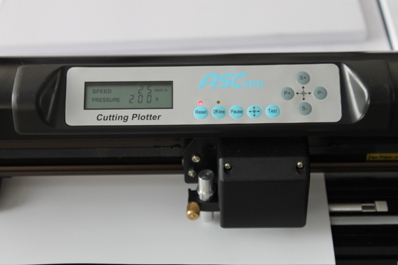
24inch 500g Cutter Plotter
|
|
Character Features
◆High strength aluminium alloying structure, streamlined design, beautifully and gracefully
◆Unique cutting blade soft landing function, cutting thinker material more easily
◆Luxurious push and pull vinyl basket, convenient for practical operation
◆With USB high speed interface, supporting plug in and off when power is on, PNP
◆Imported thin film controlling panel with nine keys, easy to operate
◆Linear bearing carriage with high precision, high temperature resistant and never deformed characters
◆Compatible with many computer operation systems such as Windows XP,Vista,Windows7 (32bit&64bit)

|
 |
 |
Technical parameter (Luxurious Type)
|
Model Item
|
JK721
|
|
Max. Paper Width
|
720mm
|
|
Max. Plotting Width
|
630mm
|
|
Net Weight/Gross Weight
|
11/21kgs
|
|
Packing Size
|
101*37*45cm
|
|
Interface
|
COM & USB
|
|
Language Format
|
DMPL/HPGL
|
|
Max. Plotting Speed
|
500mm/s
|
|
Max.Cutting Force
|
500g
|
|
Cutting Tool
|
Imported hardness alloy steel blade
|
|
Power Supply
|
AC90V~AC240V
|
|
Operation Environment
|
Temperature:5℃~35℃
Relative humidity:(30%-50%)without condensation
|
|
Colors
|
Black
|
|
|
Craftedge Software
|
| We supply technique support after your purchasing. And we provide a detaileduser manual with words, pictures and video made by ourselves, after yourordering, we will send it out with the cutter machine.
"Sure Cuts A Lot" is an easy to use software which allows you to cut virtually any shape with various electronic cutting machines, including Black Cat Cougar/Lynx, Craftwell eCraft, BossKut Gazelle, Pazzles Inspriation, Silhouette SD/CAMEO/Portrait, Silver Bullet, USCutter, & More!
With "Sure Cuts A Lot" you can cut your TrueType fonts, custom shapes and even draw your own shapes directly in "Sure Cuts A Lot", giving you endless possibilities!
NOTE: This software does not support ASC365 Cutting Plotter on Mac OS
|
|

|
Features:
- Works with your installed TrueType and OpenType fonts
- Works with thousands of free TrueType Fonts including Dingbat/Wingding Fonts
- Import various file formats, including SVG and PDF
- Drawing tools to draw and edit shapes
- Weld overlapping letters and shapes together
- Select styles, including shadow and blackout, to change the look of your letters and shapes with just a few clicks
- Auto-tracing feature to automatically convert images for cutting
- Create rhinestone templates
- Print & cut
- Cut additional shapes from the "Sure Cuts A Lot" Library
- WYSIWYG Interface - Exactly what you see is what you cut
- Availble for Windows
- Save and share your design layouts
- Free technical support and access to professionally made video training series
System Requirements:
- Pentium processor-based PC or compatible computer (Windows)
- Windows XP/Vista/7 (Windows)
- 512 MB of RAM or more
- At least 50 MB of available hard disk space
- USB Port 1.1 or 2.x
- NOTE: This software does not support ASC365 Cutting Plotter on Mac OS
|
| Latest USB Driver |
|
Instruction of ASC PU Transfer
|
 |
 |
1) Make target design by computers. Switch on the cutting plotter and better try the pressure of tool in the first step:
After cutting, the color layer as well as one layer of base paper can be easily removed at the same time. |
2) The tool should just cut half thickness of the base paper. |
 |
 |
| 3)There are 35 colors of PU vinyl transfer you can choose. |
4)Set the speed according to the size of the design. For example, set the speed faster (at 50-75) for a large design, and at 25definitely for a small one. Pressure is about 150g.Lowerspeed cutting is very important! |
 |
 |
| 5)Peel off the unwanted color layer part when finish cutting. |
6)The design on base paper should be complete without any deletion. If you peel the wanted parts ,you can press it back then continue. |
 |
 |
7)Press by heat press, Set the temperature at 150℃-175℃(310F-350F) and the time at 10s -15s.
The temperature & time is not absolute, You should adjust on actual status. |
8)Press by home Iron. Set the temperature at 150℃-175℃(310F-350F). |
 |
 |
| 9)Cool peel the base paper. |
10)A wanted design will be on your unique T-shirt completely. |
|
|


